General information
The settings page brings together your property’s configuration, the PMS connection and the email domain settings.
Access
Settings in the sidebar.
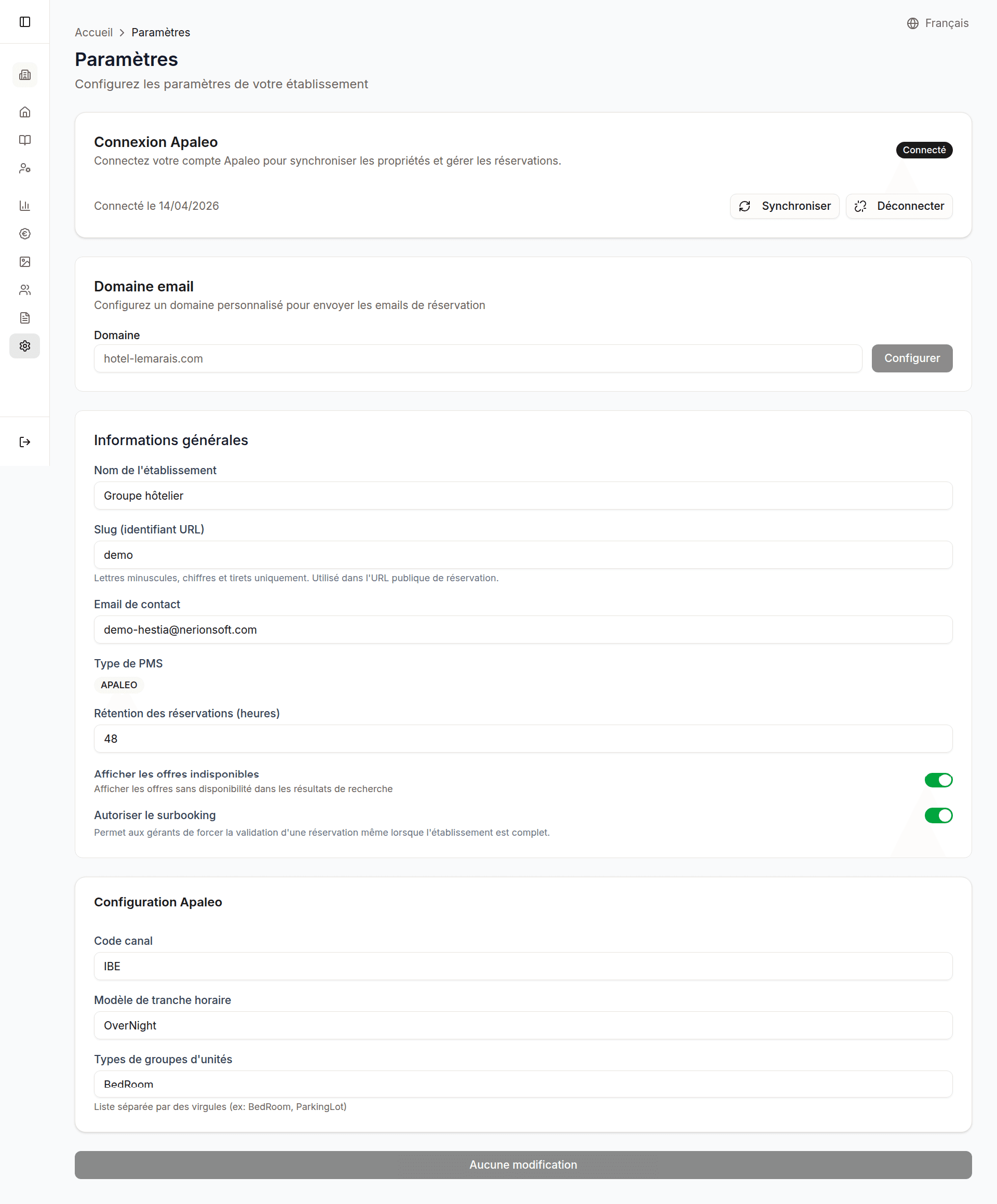
On this page:
- Apaleo connection (status, sync, disconnect)
- Custom email domain
- General information (name, slug, contact email, expiry delay)
Apaleo connection
The connection to your PMS is done via OAuth2 (secure authorization).
| Element | Description |
|---|---|
| Status | Connected / Not connected |
| Connect | Starts the OAuth2 authorization flow with Apaleo |
| Sync | Opens the property selection, then syncs the chosen ones |
| Subscriptions | Chooses which rate plans feed the engine’s rate grid and “from” prices |
| Disconnect | Revokes access and removes the tokens |
Connection procedure
- Click Connect to Apaleo
- You are redirected to Apaleo to authorize access
- After authorization, you are automatically returned to Hestia
- Open Sync to choose and import your properties (see below)
Exposed properties
Sync and property selection are a single action: the Sync button opens the selection. If your Apaleo account holds several properties, you choose which ones are sold through the booking engine.
- Click Sync
- The dialog lists every property in your Apaleo account, with a checkbox per property
- Check the ones to expose, uncheck the ones to hide
- Click Save
Only checked properties are fetched and synced from Apaleo: until you select some, nothing is imported.
A hidden property is not bookable (its rooms, rates and services appear neither on the booking page nor in the dashboard catalog). It stays visible in this dialog: re-check it to expose it again. Saving a selection triggers a sync.
Rate subscriptions
When Apaleo is connected, the Subscriptions button opens a dialog that lists, for each exposed property, its rate plans that are distributed on the IBE (booking-engine) channel in Apaleo. Each plan has a checkbox, plus a per-property checkbox to select them all at once. The boxes are pre-checked to match the current subscriptions.
These subscriptions control which rate plans push their availability and rates into the booking engine. Apaleo pushes updates to the engine (instead of the engine querying the PMS live), and this data feeds the rate grid and the “from” prices.
- Click Subscriptions
- For each property, check the rate plans to subscribe (or use the property checkbox to select them all)
- Click Save & sync
Saving resubscribes each property to the checked set and triggers an immediate sync. New rates land within a few seconds, up to about 5 minutes.
If no rate plan is distributed on the IBE channel, the dialog asks you to enable IBE distribution on a rate plan in Apaleo first.
Good to know: the selection applies immediately but is not a permanent lock. A later PMS sync, or a rate-plan change made directly in Apaleo, can re-derive the subscribed set automatically. If that happens, re-open the Subscriptions dialog and adjust your selection again.
General information
| Field | Description |
|---|---|
| Property name | Name displayed publicly on your booking page |
| Slug | URL identifier for your property (e.g. my-hotel) |
| Contact email | Email address shown to guests and used for replies |
| Expiry delay | Time before unprocessed bookings expire (in hours) |