Edit a booking
Editing is only possible in the To process and Awaiting response statuses.
Booker and lead guest
Click the pencil on the card to open the edit form.
Also update the lead guest
Checkbox at the bottom of the booker form. Syncs to the lead guest of each room:
- Title, last name, first name
- Email, phone
- Full address
- Nationality
- ID document (type, number, dates)
Guest-specific fields (e.g. vehicle, migration) are not overwritten.

Pricing
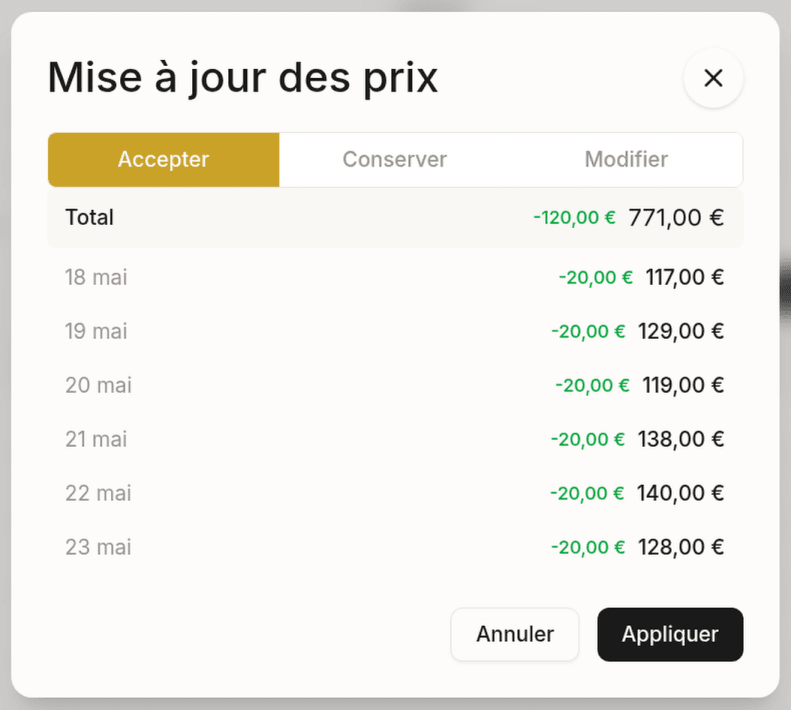
Price dialog (rate plan change)
Opens automatically when you change the rate plan.
| Option | Behavior |
|---|---|
| Accept | Replaces all prices with those of the new rate |
| Keep | Keeps your current prices, only the rate plan changes |
| Edit | Prefills with your current prices, editable night by night or via the total |
Date change
Prices do not change automatically:
- Existing nights: prices kept
- New nights: current rate plan prices
- Removed nights: dropped
If the rate plan is no longer available for the new dates, the selector turns red.
Discount
Percentage applied only on save (the data is not modified until you save). Resets to zero each time it opens.
Reset prices
Replaces manual prices with the original prices of the selected rate plan.
Customer notification
On save, a notification dialog is shown:
- Notify the customer: on by default. Turn it off to save without sending an email.
- Message: prefilled in the customer’s language. Freely editable before sending.
- Language selector: lets you change the language of the prefilled message.
Staff always receive a notification, whatever the choice.
Last updated on