Decline a booking
Declining lets you turn down a booking request before it is confirmed.
Prerequisite
The booking must have the To process or Awaiting response status.
To cancel an already confirmed booking, use Cancel a booking instead.
Procedure
- Open the booking detail
- Click the Decline button
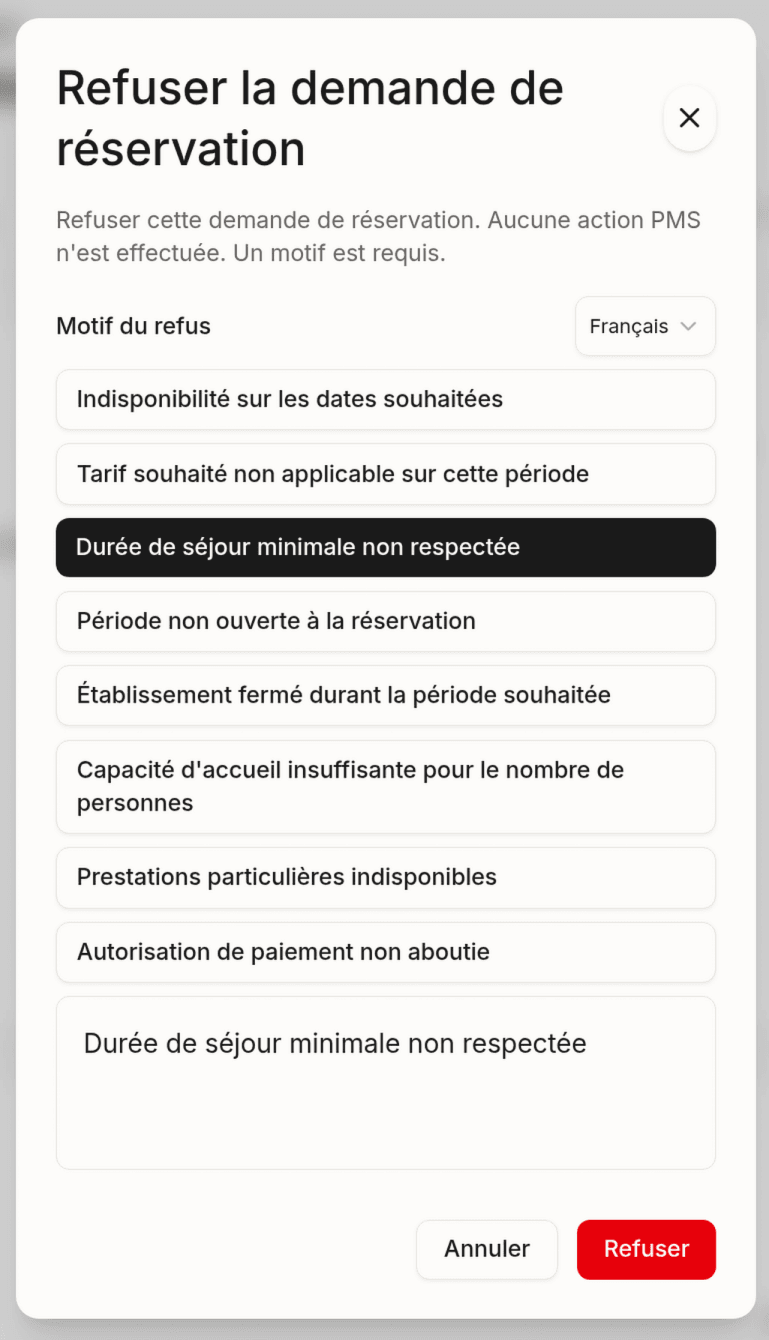
- Select a decline reason:
| Reason | Use case |
|---|---|
| No availability | No room left for the requested dates |
| Rate unavailable | The requested rate plan is no longer active |
| Minimum stay not met | The stay is too short for this rate |
| Outside booking window | The dates fall outside the booking period |
| Property closed | Seasonal or temporary closure |
| Group too large | The number of guests exceeds capacity |
| Special requests unavailable | Unable to meet the customer’s requests |
| Payment authorization failed | Bank pre-authorization issue |
- (Optional) Add a custom comment
- Click Confirm the decline
Result
- The status changes to Declined
- The customer receives an email with the decline reason and a suggestion to book for other dates
- The reason is visible in the booking detail
Note: Declining is final. If the customer wants to book, they will have to submit a new request.
Last updated on