Record a payment
Hestia Reservation lets you record payments received offline (cash, bank card, transfer…) to track the balance of each booking.
When to record a payment?
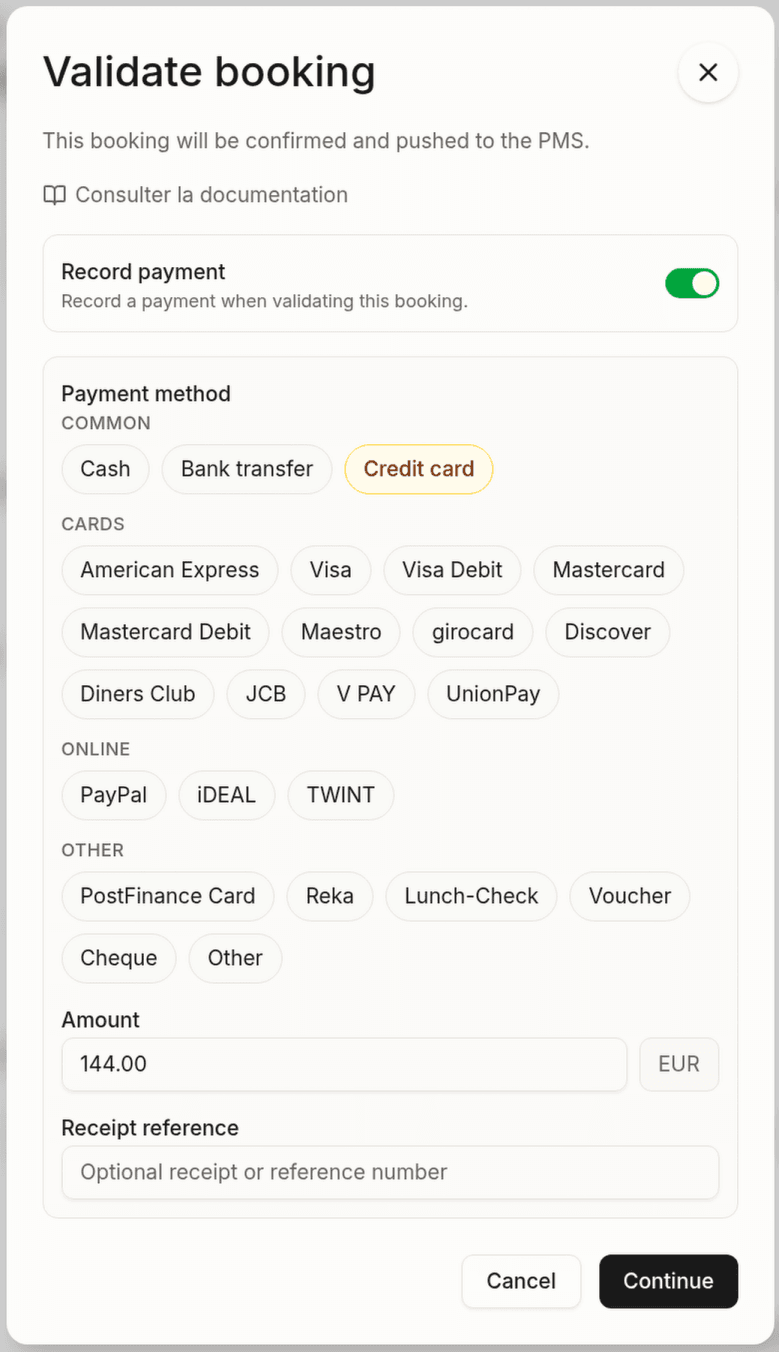
A payment is recorded at the time of confirmation of the booking. The confirmation dialog offers a built-in option to record a first payment at the same time as validation.
Procedure
- Open the booking detail with the Awaiting response status
- Click Confirm
- In the dialog, tick Record a payment and fill in:
| Field | Description |
|---|---|
| Payment method | Select the method used from the chips: cash, bank transfer, credit card or a specific card brand (Visa, Mastercard, American Express…), online wallets (PayPal, TWINT, iDEAL…), cheque, voucher, other |
| Amount | Payment amount in euros |
| Reference | (Optional) Receipt number or transaction reference |
Prefer the exact card brand (Visa, Mastercard, American Express…) over a generic “Credit card”: the per-brand detail makes accounting reconciliation easier in the PMS.
- Click Record
Payment tracking
The folio is visible in the Folio section of the detail page. It shows:
- Charges: total amount due (accommodation + services)
- Payments: list of all recorded payments with date, amount and method
- Balance: amount left to pay
Payment status
| Status | Description |
|---|---|
| Paid | The balance is zero |
| Partial | One or more payments recorded, balance remaining |
| Due | No payment recorded |
PMS sync
Payments recorded in Hestia are synced with the booking’s folio in Apaleo. The balance, charges and payment history shown in the Folio section come directly from the PMS.
Online payment is not available yet. Payments are recorded manually by staff.